A bookmark may be small, but it can do more than hold a reader’s place.
Businesses can use bookmarks to promote a service, share a discount, introduce a product, encourage repeat purchases, or give customers something useful enough to keep. Authors can promote a new book. Schools can share reading goals. Nonprofits can build awareness around a cause.
The challenge is deciding what deserves space.
A bookmark should not become a miniature brochure filled with everything you want customers to know. The most effective designs usually combine one clear message with useful branding and one simple next step.
This guide explains what to put on a bookmark, how to organize the front and back, and how to adapt the content for different businesses, events, and audiences.
Quick Answer: What Should You Put on a Bookmark?
Most promotional bookmarks should include:
- A clear headline or short message
- Business, organization, event, or author name
- Logo or recognizable visual identity
- One strong image, illustration, or design element
- Website, social handle, or other contact method
- One call to action
- Optional QR code
- Optional offer, promotional code, or expiration date
The exact content depends on what the bookmark needs to accomplish.
| Bookmark Goal | What to Include |
| Build brand awareness | Logo, short tagline, website, recognizable design |
| Promote a book | Book cover, title, author name, release information, QR code |
| Generate sales | Main benefit, offer, promotional code, call to action |
| Encourage another purchase | Thank-you message, return offer, website or QR code |
| Promote an event | Event name, date, location, registration details |
| Support education | Reading tips, vocabulary, schedule, helpful reference information |
| Raise awareness | Cause, short explanation, website, donation or action link |
| Create a keepsake | Illustration, quote, date, names, memorable message |
| Drive store visits | Location, offer, hours, directions or map link |
| Share contact information | Name, website, email, phone number or social handle |
You do not need every element in the table.
Begin by choosing the bookmark’s primary purpose. Then include only the information that supports that purpose.
Start With One Job for the Bookmark

Before choosing colors, fonts, or images, complete this sentence:
This bookmark should help the reader ________.
For example:
- Remember our business
- Visit our online store
- Preorder a new book
- Register for an event
- Use a discount
- Track a reading challenge
- Book an appointment
- Learn more about a cause
- Follow our social media account
- Care for the product they purchased
The answer determines what belongs in the design.
A bookstore promoting a new location needs different content from an online candle company including bookmarks inside customer orders. A school reading challenge needs different content from an author giveaway.
Trying to give the bookmark several unrelated jobs usually creates a crowded design.
Instead of asking:
“What information can we fit?”
ask:
“What information does the reader need next?”
What Goes on the Front and Back of a Bookmark?
Using both sides gives you room to separate attention-grabbing content from practical details.
A simple structure is:
Front of the Bookmark
Use the front to attract attention and establish the main idea.
Consider including:
- Headline
- Logo or book title
- Strong image or illustration
- Short quote
- Main offer
- Brand colors
- Event or campaign name
Back of the Bookmark
Use the back for information and action.
Consider including:
- Short supporting message
- Website
- QR code
- Social media handle
- Promotional code
- Contact information
- Event details
- Terms or expiration date
- Reading tracker or useful reference content
For example, a bakery could create this layout:
Front
Every Chapter Deserves Something Sweet
Bakery logo and branded illustration
Back
Bring this bookmark to our downtown shop and receive a free cookie with an eligible purchase.*
Website
Address
Promotional code
Expiration date and terms
The front creates interest. The back explains what to do.
This is not the only possible layout. A functional bookmark might place a reading tracker on the front and the organization’s information on the back. An author bookmark might display the book cover on one side and a short description on the other.
What matters is giving each side a clear role.
1. Add a Clear Headline or Main Message
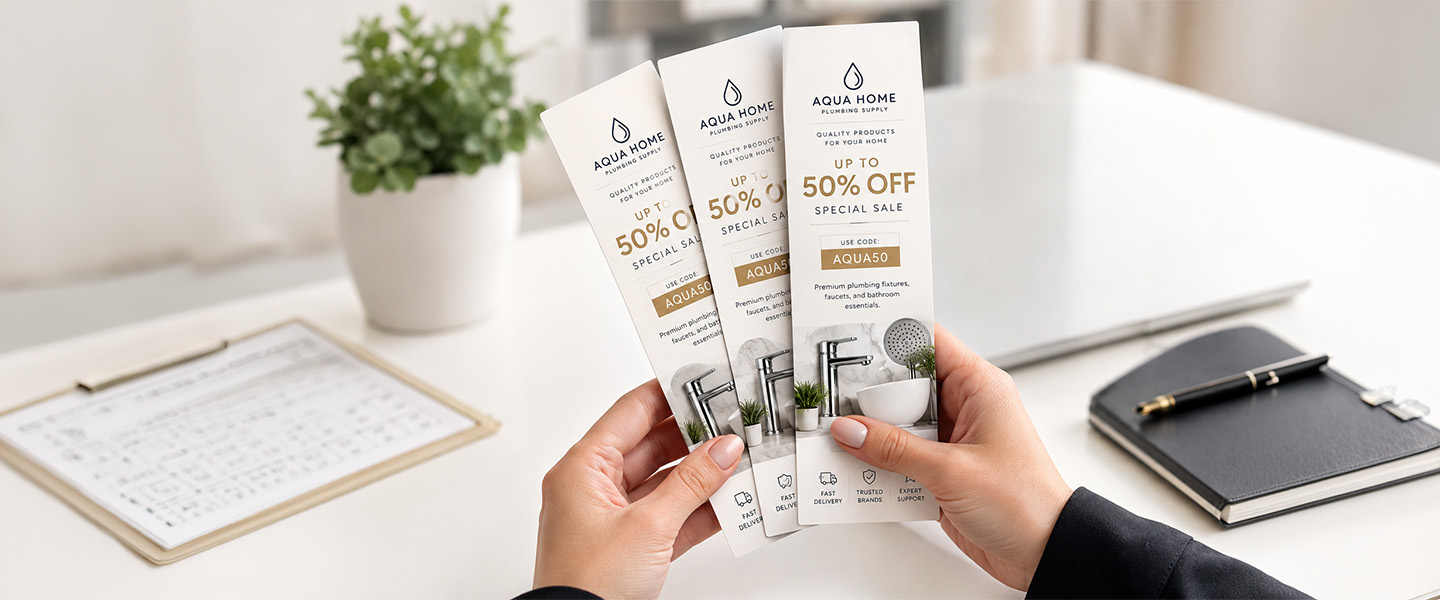
The headline is the first message someone should notice.
It can communicate:
- A benefit
- An offer
- A theme
- A campaign
- A question
- A short invitation
- A memorable phrase
Instead of using only the company name, consider a headline that gives the reader a reason to pay attention.
For a coffee shop:
Good Books Deserve Great Coffee
For a tutor:
Make This Your Strongest School Year
For a bookstore:
Your Next Favorite Story Is Waiting
For a nonprofit:
Every Child Deserves a Book of Their Own
For an online shop:
Thanks for Supporting Our Small Business
The headline does not need to be clever. It needs to be relevant and easy to understand.
Avoid vague phrases such as:
- Discover more
- Imagine the possibilities
- Something special awaits
- Quality you can trust
These phrases take up space without telling the reader what the bookmark is about.
2. Include the Brand, Author, or Organization Name
Someone who finds the bookmark later should be able to identify where it came from.
Include the relevant name:
- Business name
- Author name
- Book title
- School name
- Event name
- Nonprofit name
- Campaign name
- Sponsor name
The name does not always need to be the largest element.
For example, an author bookmark may prioritize the book title on the front and place the author’s name underneath. A business bookmark may lead with a customer benefit while keeping the logo visible at the bottom.
Make sure the name is readable and does not disappear into an overly detailed background.
3. Use a Logo or Recognizable Brand Element
A logo can help connect the bookmark with the rest of the brand experience.
However, branding is more than placing a logo in the corner.
You can also use:
- Brand colors
- Fonts
- Illustration style
- Photography style
- Graphic patterns
- Icons
- Brand voice
- Product imagery
A customer who has seen your packaging, website, storefront, or social media should recognize the visual connection.
Avoid stretching, compressing, recoloring, or placing the logo over a background that makes it difficult to see. Use a high-resolution or vector version whenever possible.
4. Give the Reader Something Useful
A bookmark is already a functional object. Adding another useful feature can give someone more reason to keep it.
Useful bookmark content ideas include:
- Reading tracker
- Monthly reading goals
- Book-rating scale
- Recommended reading list
- Vocabulary reference
- Multiplication table
- Calendar
- Measurement conversions
- Writing prompts
- Study tips
- Care instructions
- Recipe
- Checklist
- Emergency contact information
- Library hours
- Event schedule
- Loyalty tracker
- Appointment information
For example, a bookstore bookmark could include:
My Next Five Reads
A coffee shop could add a simple loyalty tracker:
Buy 6 drinks. Your next eligible drink is on us.
○ ○ ○ ○ ○ ○
A plant shop could include:
New Plant Checklist
□ Check the soil
□ Find the right light
□ Keep away from cold drafts
□ Scan for full care instructions
Useful content should connect naturally to the business or campaign. A measurement conversion chart may make sense for a craft store, but not necessarily for a dental office.
5. Add One Clear Call to Action
A call to action tells readers what to do after seeing the bookmark.
Examples include:
- Shop the collection
- Preorder the book
- Scan for reading recommendations
- Book an appointment
- Visit our new location
- Register for the event
- Join the reading challenge
- Use this code online
- Follow the story
- Donate books
- Explore the full menu
- Leave a review
- Start your next order
- Download the free guide
Choose one primary action.
A bookmark that says “Visit our website, follow us on five platforms, join our newsletter, call us, leave a review, and visit the store” gives every action the same importance.
A better approach is:
Scan to Find Your Next Read
The QR code can lead to a landing page that contains the other information.
6. Include a Website or Relevant Contact Information
Contact information helps the reader reconnect with the business or organization later.
Depending on the goal, that could include:
- Website
- Email address
- Phone number
- Store address
- Social media handle
- Booking page
- Online shop
- Event registration page
Do not automatically include every available contact method.
A local restaurant may need its address and website. An online creator may need only a social handle and QR code. An author may direct readers to a book landing page instead of listing a personal email address.
Use a short, memorable web address when possible. Long URLs filled with tracking characters are difficult to read and type.
7. Use a QR Code When It Makes the Next Step Easier
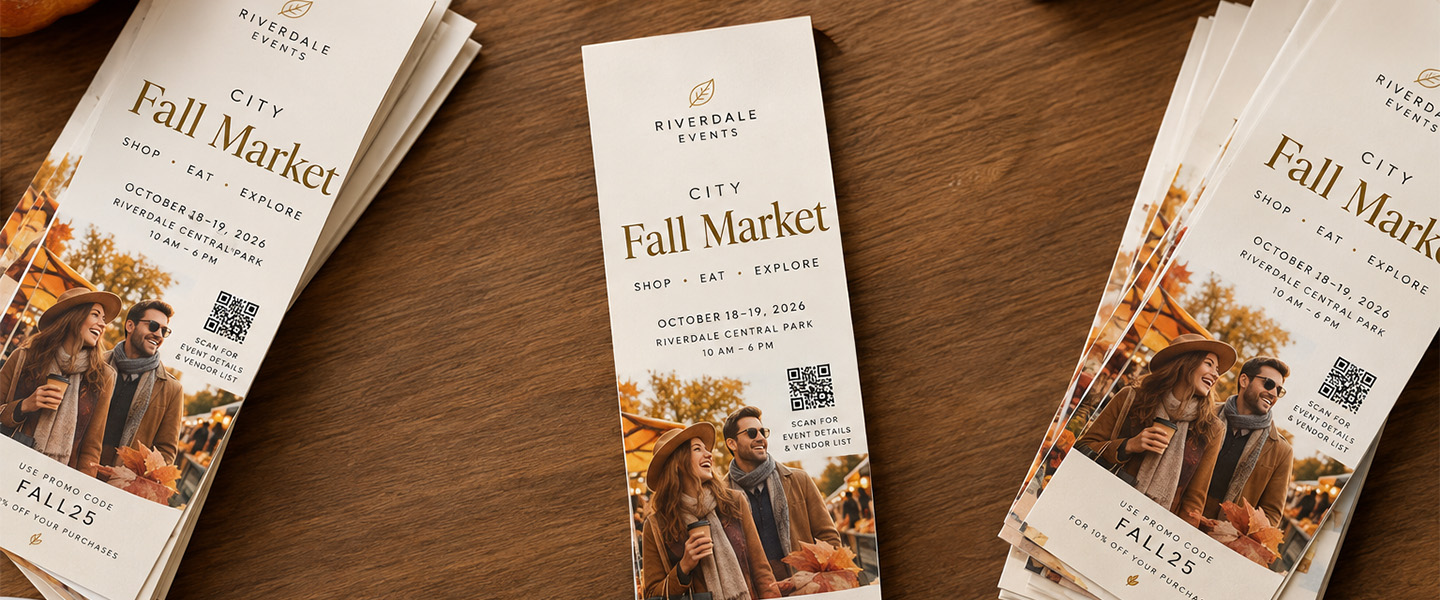
A QR code can connect the bookmark to digital content without using much space.
It might lead to:
- Online store
- Book page
- Author website
- Appointment calendar
- Event registration
- Donation page
- Reading list
- Digital menu
- Social media profile
- Product instructions
- Downloadable resource
- Customer review page
- Campaign landing page
The text beside the QR code should explain where it goes.
Instead of:
Scan Me
try:
Scan to Read the First Chapter
or:
Scan to Book Your Appointment
or:
Scan for Plant Care Instructions
This gives the reader a reason to use it.
Before printing, test the QR code:
- At the intended printed size
- On more than one phone
- Under normal lighting
- From a comfortable scanning distance
- After printing a physical proof, when possible
The destination should also be mobile-friendly. A QR code that leads to a page that is difficult to use on a phone creates unnecessary friction.
8. Add an Offer Only When It Supports the Goal
Bookmarks can work as coupons or repeat-purchase incentives.
Possible offers include:
- Percentage discount
- Dollar-amount discount
- Free add-on
- Buy-one-get-one offer
- Free consultation
- Loyalty reward
- Complimentary sample
- Event admission offer
- Early access
- Free downloadable resource
For example:
Save 15% on Your Next Online Order
Use code: READ15
Offer ends November 30.*
Or:
Bring This Bookmark to Our Café
Receive a free eligible pastry with the purchase of any large drink.*
Make the conditions clear.
The reader should be able to answer:
- What do I receive?
- What do I need to do?
- When does the offer expire?
- Are there important limitations?
If the terms are too complicated to fit legibly, direct the reader to a webpage with full details.
Do not add a discount simply because the bookmark is promotional. A useful design, memorable illustration, resource, or message may be enough.
9. Consider Adding a Quote
Quotes are popular bookmark content because they fit naturally with reading, education, motivation, and gifting.
A quote might relate to:
- Books
- Learning
- Creativity
- Personal growth
- The organization’s mission
- The campaign theme
- The customer experience
You can also create an original brand line instead of using a famous quote.
Examples include:
One More Chapter
Read Often. Wonder Always.
Your Next Adventure Starts Here.
Great Ideas Need a Place to Begin.
Keep Growing, One Page at a Time.
Be careful when using quotes written by other people. Do not assume that a quote is free to use simply because it appears online. Confirm the wording, attribution, and applicable usage rights before including it in a commercial design.
10. Add Dates and Details for Events
An event bookmark should work as both a reminder and a small advertisement.
Include:
- Event name
- Date
- Time
- Location
- Short explanation
- Registration method
- QR code or website
- Relevant deadline
For example:
Downtown Book Festival
Saturday, October 17
10 AM–5 PM
Central Library Plaza
Author talks • Children’s activities • Local booksellers
Scan for the full schedule
Avoid making people scan the QR code just to learn the event’s date or location. Put the essential decision-making information directly on the bookmark, then use the code for the full schedule, tickets, or registration.
Bookmark Content Ideas for Different Uses
The right bookmark content depends on who will receive it and why.
Here are several ready-to-adapt approaches.
Business Bookmark Example
A general business bookmark should communicate one useful reason to remember the company.
Front
Make Your Next Project Easier
[Business logo]
Back
Professional printing for business cards, brochures, postcards, stickers, and more.
[QR code]
Explore printing options
Website
This type of bookmark can be included with customer orders, distributed at events, or displayed at a front counter.
When you are ready to produce the finished piece, explore custom bookmark printing from Overnight Prints.
Retail Store Bookmark Example
A retail store can use a bookmark to encourage another visit.
Front
Something New Is Always Arriving
Store logo and product illustration
Back
Visit us at:
123 Main Street
Monday–Saturday, 10 AM–7 PM
Scan to see new arrivals
[QR code]
The bookmark could also include a limited-time offer, loyalty tracker, or event calendar.
E-Commerce Packaging Insert Example
A bookmark can replace a standard rectangular insert when the shape and purpose fit the brand.
Front
Thank You for Supporting Our Small Business
Brand illustration
Back
We hope you love your order.
Scan for product-care instructions and support.
[QR code]
@BrandHandle
This works especially well for books, stationery, crafts, art prints, journals, gifts, and other products connected to creativity or reading.
For more packaging inspiration, see these custom sticker ideas for small-business packaging.
Author Bookmark Example
Authors can use bookmarks to promote a specific title or series.
Front
Book cover
Book title
Author name
Back
A short one- or two-sentence description
When a forgotten map leads Mara beyond the city walls, she discovers that the kingdom’s oldest legend may be a warning—not a story.
Available October 20
[QR code]
Read the first chapter
Avoid placing the entire book synopsis on the bookmark. Create enough interest to encourage the reader to take the next step.
Bookstore Bookmark Example
A bookstore bookmark can provide ongoing value while keeping the store visible.
Front
Your Next Favorite Book Is Here
Store logo and illustration
Back
My Reading List
□ __________
□ __________
□ __________
□ __________
Store address
Website
Another option is to feature staff recommendations, upcoming events, book club dates, or a loyalty program.
Library Bookmark Example
Libraries can use bookmarks for information, education, and community programs.
Possible content includes:
- Library hours
- Reading challenge
- Upcoming events
- Digital catalog QR code
- Account login instructions
- Book return reminders
- Children’s reading tracker
- Research resources
- Library contact information
Example:
Front
Read 20 Minutes a Day
Back
Summer Reading Tracker
□ Monday
□ Tuesday
□ Wednesday
□ Thursday
□ Friday
□ Saturday
□ Sunday
[Library name]
Scan to join the summer reading program.
School Bookmark Example
Schools, tutors, and educational programs can create bookmarks students will actually use.
Ideas include:
- Study checklist
- Reading goals
- Vocabulary
- Math formulas
- School calendar
- Writing prompts
- Library information
- Encouraging message
- Student support resources
Example:
Before You Submit Your Assignment
□ Did I answer every question?
□ Did I check my spelling?
□ Did I include my name?
□ Did I review my work?
School logo
Support website
Keep the content appropriate for the students’ age and make sure the text is large enough to read comfortably.
Nonprofit Bookmark Example
A nonprofit bookmark should connect the mission with one achievable action.
Front
Help Put More Books in More Hands
Mission-focused image
Back
Your support helps provide free books to children in our community.
[QR code]
Donate a book
Organization name
Website
Avoid filling the bookmark with internal language or several paragraphs about the organization. Explain the impact in clear, human terms.
Event Bookmark Example
Bookmarks can work as event invitations, schedule reminders, or attendee giveaways.
Front
Local Authors. New Stories. One Unforgettable Weekend.
River City Book Festival
Back
October 17–18
Central Library Plaza
Panels • Signings • Workshops • Children’s activities
[QR code]
View the schedule
The bookmark can remain useful after the event if the design includes an illustration, reading list, or quote worth keeping.
Café or Restaurant Bookmark Example
A café near a bookstore, school, college, or library can create a promotion that feels relevant to the audience.
Front
Your Reading Break Just Got Better
Café logo
Back
Show this bookmark and receive [offer].*
123 Main Street
[QR code]
View the menu
Expiration date and terms
The offer should make financial sense for the business and be easy for employees to recognize and process.
Healthcare or Service Business Example
A bookmark may not be the most obvious format for a healthcare provider, salon, tutor, consultant, or other service company, but it can work when distributed with helpful educational material.
For example, an optometrist could create:
Front
Give Your Eyes a Screen Break
Back
Try the 20-20-20 reminder:
Every 20 minutes, look at something approximately 20 feet away for 20 seconds.
Practice name
Website
Appointment QR code
Any health-related information should be reviewed for accuracy and should not make unsupported claims.
Wedding or Personal Event Bookmark Example
Bookmarks can also become keepsakes for weddings, anniversaries, memorials, graduations, baby showers, and other personal events.
They might include:
- Names
- Date
- Short message
- Meaningful quote
- Illustration
- Event location
- Thank-you note
- Photograph
- Personal hashtag
For example:
Front
A New Chapter Begins
Elena & Daniel
June 12, 2027
Back
Thank you for celebrating with us.
Floral illustration
The design can match invitations, menus, place cards, or other event materials.
Should a Bookmark Be Promotional or Useful?
It can be both.
A purely promotional bookmark may be discarded once the offer expires. A purely decorative bookmark may be kept but generate little engagement with the brand.
Combining usefulness with a relevant next step can create a stronger piece.
For example:
| Promotional Content | Useful Content |
| Bookstore website | Reading tracker |
| Tutoring service QR code | Study checklist |
| Café offer | Reading quote |
| Plant shop website | Plant-care reminder |
| Author preorder link | Recommended reading list |
| Library program link | Event calendar |
| Craft store discount | Measurement conversions |
The useful content gives the reader a reason to keep the bookmark. The promotional content helps the organization remain visible.
The two should support each other rather than compete for space.
How to Organize a Bookmark Design
A bookmark has a narrow shape, so visual hierarchy matters.
The reader should not need to search for the main message.
A practical hierarchy is:
- Main headline or visual
- Brand, book, or event name
- Short supporting information
- Call to action
- Website or QR code
- Terms or secondary details
You can test the hierarchy by looking at the design from a distance.
What do you notice first?
If the answer is a decorative shape, tiny photograph, or unrelated background element instead of the main message, adjust the design.
Design for the Vertical Format
Bookmarks are usually tall and narrow. Build the layout for that shape instead of squeezing in a design created for a flyer, postcard, or social media post.
Layouts that can work well include:
- Headline at the top, image in the center, logo and CTA at the bottom
- Full-height illustration with minimal text
- Book cover on one side and details on the other
- Vertical checklist or reading tracker
- Repeating pattern with a centered message
- Large quote with small branding underneath
- Vertical timeline or event schedule
- Several clearly separated content blocks
Avoid placing every line of text vertically or rotating large amounts of copy. A rotated title can sometimes work as a design choice, but readers should not need to turn the bookmark repeatedly to understand it.
Choose Readable Typography
Bookmarks may be viewed up close, but that does not make extremely small text easy to read.
Use:
- A clear font for essential information
- Strong contrast between text and background
- Consistent spacing
- A limited number of typefaces
- Larger text for the primary message
- Enough room around QR codes and contact information
Decorative fonts can work for a short title or quote. Use a simpler font for dates, URLs, terms, and supporting information.
Before approving the design, print it at actual size. Viewing an enlarged bookmark on a computer screen can make small text appear more readable than it will be in the finished piece.
Use Images That Fit the Shape
Choose photographs and illustrations that work within a narrow composition.
Good options include:
- Single character or object
- Book stack
- Tall building
- Plant or floral arrangement
- Vertical landscape crop
- Product close-up
- Simple repeating pattern
- Full-bleed illustration
- Minimal icon set
A wide group photograph or horizontal landscape may lose important details when cropped to fit a bookmark.
Do not stretch an image to force it into the layout. Crop it thoughtfully or choose a different image.
Use high-resolution artwork at the final printed size. Images copied from websites, screenshots, and small social media graphics may appear blurry or pixelated in print.
Leave Enough Empty Space
A narrow format can feel crowded quickly.
Empty space helps separate:
- Headline from supporting text
- QR code from surrounding artwork
- Logo from contact details
- Offer from terms
- Quote from attribution
You do not need to fill every inch.
A bookmark with one strong illustration and one short phrase can be more memorable than a bookmark containing a dense list of services.
Keep the Front and Back Visually Connected
The two sides can have different purposes without looking like unrelated designs.
Connect them through:
- Colors
- Fonts
- Illustration style
- Borders
- Graphic patterns
- Logo placement
- Repeated shapes
- Consistent tone
Check the orientation before printing. Depending on how the artwork is prepared and flipped, the back may appear upside down when the physical bookmark is turned over.
Use the printer’s template and proofing tools to confirm the correct front-and-back orientation.
How Much Text Should a Bookmark Have?
Use the shortest amount of text required to communicate the message.
A bookmark is not the place for:
- Full company history
- Complete service list
- Long author biography
- Detailed event schedule
- Several testimonials
- Multiple product descriptions
- Complicated offer terms
- Long mission statement
A practical bookmark might contain:
- Headline: 3–8 words
- Supporting message: 1–3 short sentences
- Call to action: 2–6 words
- Contact information
- Optional offer terms
These are guidelines, not fixed rules. A bookmark containing a poem, educational reference, or event schedule may need more text. In those cases, readability still matters more than filling the available space.
Common Bookmark Design Mistakes
Trying to Include Everything
A bookmark cannot serve as a business card, brochure, product catalog, event flyer, and coupon at the same time.
Choose one primary purpose and remove content that does not support it.
Making the Logo the Only Message
A logo identifies the business, but it does not explain why someone should keep or use the bookmark.
Add a useful message, visual, offer, or action.
Using Text That Is Too Small
If the information fits only after reducing it to an uncomfortable size, there is too much information.
Move secondary details to a landing page and use a QR code or short URL.
Adding a QR Code Without Context
“Scan me” does not explain the benefit.
Tell readers whether the code opens a menu, event schedule, book preview, discount, donation page, or appointment calendar.
Using a Low-Quality Image
A small or compressed image may look fine on a screen but print poorly.
Use high-resolution source files and review the artwork at its actual physical size.
Placing Important Content Too Close to the Edge
Text, logos, QR codes, and important parts of images need space from the trim line.
Use the printer’s safe-zone guidance rather than estimating by eye.
Forgetting Bleed
If a color, illustration, or photograph should extend to the finished edge, it usually needs to extend beyond the trim line into the required bleed area.
Otherwise, normal trimming variation may leave an unwanted white edge.
Using an Untested QR Code
A QR code can fail because it is too small, lacks contrast, is surrounded by busy artwork, or points to an incorrect page.
Test the printed version before approving the full order.
Omitting Offer Details
If the bookmark includes a promotion, clearly show the expiration date and important conditions.
Customers and employees should not have to guess how the offer works.
Printing Too Many Time-Sensitive Bookmarks
A bookmark containing an expiration date, event date, price, team member, or temporary URL can become outdated.
Choose the quantity based on how and when the bookmarks will be distributed.
How to Prepare a Bookmark for Printing
Before submitting the design, review the current printer specifications for:
- Finished size
- Bleed
- Safe zone
- File format
- Resolution
- Color mode
- Front-and-back orientation
- Accepted fonts and transparencies
Use the Correct Document Size
Create the artwork at the dimensions required for the selected bookmark.
Do not design a flyer or social post and shrink it into the narrow format. Rebuild the layout so the hierarchy and images fit naturally.
Extend Backgrounds Into the Bleed Area
Any background color, pattern, illustration, or photograph intended to reach the edge should continue beyond the trim line according to the printer’s specifications.
Keep Essential Content Inside the Safe Zone
Protect:
- Text
- Logo
- Website
- QR code
- Promotional code
- Offer details
- Important image content
Bleed and the safe zone serve different purposes. Bleed extends background artwork beyond the cut. The safe zone keeps essential content away from it.
Check Image Resolution
Use clear, high-quality source files at their intended printed size.
Enlarging a low-resolution image does not restore missing detail.
Review the Color Mode
Screen colors and printed colors are produced differently. A bright color on a monitor may not reproduce exactly the same way in print.
Review the printer’s color requirements and use an appropriate print-ready file.
Proofread Every Detail
Confirm:
- Names
- Dates
- Website
- Phone number
- Address
- Social handle
- Promotional code
- Offer terms
- QR-code destination
- Quote wording and attribution
Print a paper proof at actual size to evaluate the text, spacing, orientation, and QR code before placing a larger order.
Frequently Asked Questions About Bookmark Design
What information should be on a bookmark?
A promotional bookmark typically includes a headline, brand or organization name, logo, visual element, website or contact method, and one call to action.
Depending on its purpose, it may also include a QR code, offer, quote, event details, reading tracker, checklist, or other useful content.
What should go on the front and back of a bookmark?
The front usually works best for the main headline, image, book cover, quote, or campaign message. The back can contain supporting information, contact details, QR code, call to action, offer terms, or useful content.
There is no mandatory arrangement, but separating visual impact from practical details can make the bookmark easier to understand.
What makes a good bookmark design?
A good bookmark has one clear purpose, readable text, strong visual hierarchy, appropriate images, enough empty space, and branding that is easy to recognize.
It should also be prepared according to the printer’s size, bleed, safe-zone, resolution, and file requirements.
Should a bookmark include a QR code?
A QR code is useful when it gives the reader an easy next step, such as visiting a store, reading a book preview, booking an appointment, registering for an event, or accessing instructions.
Explain what the code opens and test it at the final printed size before ordering.
Should a bookmark be one-sided or two-sided?
A one-sided bookmark can work for a simple illustration, quote, or message. A two-sided bookmark provides more room to separate the main visual from contact information, offers, event details, or useful content.
Use the second side only when the additional information adds value.
Can a bookmark be used as a business card?
A bookmark can include contact information, but its larger, narrower format gives it a different purpose from a traditional business card.
Bookmarks work best when usefulness, creativity, reading, education, packaging, or a specific campaign makes the shape relevant. For routine professional introductions, business cards may be more practical.
Can businesses use bookmarks for marketing?
Yes. Businesses can distribute bookmarks at events, place them in customer orders, display them at counters, include them in welcome packages, or use them as coupons and loyalty cards.
They are especially relevant for bookstores, authors, schools, libraries, publishers, cafés, tutors, museums, gift shops, and creative businesses. Other companies can use them when the format fits the audience or campaign.
Do bookmarks need contact information?
Include enough information for readers to identify and reconnect with the business, author, event, or organization.
That may be a website, QR code, social handle, location, email address, or phone number. You do not need to include every contact method.
What can I put on a bookmark besides a quote?
Alternatives include:
- Reading tracker
- Checklist
- Promotional offer
- QR code
- Book cover
- Event information
- Product-care instructions
- Loyalty tracker
- Reading recommendations
- Study tips
- Calendar
- Recipe
- Writing prompt
- Donation message
- Original illustration
Choose content that makes sense for the intended reader.
How do I make a bookmark people will keep?
Give it a reason to remain useful after the first interaction.
That might mean including attractive artwork, a reading tracker, helpful reference information, a meaningful message, product instructions, or a simple loyalty program.
The promotional content should not overwhelm the feature that makes the bookmark worth keeping.
Give Every Part of the Bookmark a Purpose
The best bookmark designs do not use every inch of available space.
They use the space intentionally.
Start by deciding what the bookmark should help the reader remember, learn, or do. Build the front around one strong idea. Use the back for the next step, useful information, or supporting details.
An author may feature a book cover and preview link. A retailer may include a return offer. A school may create a reading tracker. A nonprofit may introduce its mission and invite one simple action.
Different goals require different content, but the principle remains the same:
Give readers one clear reason to keep the bookmark and one clear way to reconnect with you.
When your design is ready, create a useful, memorable piece with custom bookmark printing from Overnight Prints.