To design a gift certificate for your business, clearly show the business name, certificate value or offer, recipient information if needed, redemption instructions, important terms, and a unique code or tracking method in a simple branded layout.
A customer walks into your business and says:
“I’d like to buy a $100 gift certificate for my mom.”
What do you hand them?
A gift certificate has to do more than look like a nice piece of paper.
The recipient needs to immediately understand:
What did I receive?
Where can I use it?
What is it worth?
How do I redeem it?
And your business needs to know:
Is this certificate legitimate?
Has it already been redeemed?
What transaction does it belong to?
Good gift certificate design solves both sides of that exchange.
Let’s build one from the beginning.
Start With What You’re Actually Giving

Before opening a design program, decide what the certificate represents.
Is it a dollar amount?
$25 Gift Certificate
$50 Gift Certificate
$100 Gift Certificate
Or a specific product or service?
One 60-Minute Massage
Dinner for Two
One Family Photography Session
One Haircut & Style
One Private Consultation
These create slightly different design requirements.
A dollar-value certificate needs the amount to be immediately visible.
A service certificate needs the included service to be unmistakable.
You can also create certificates where the purchaser chooses the amount and a staff member fills it in at the time of purchase.
For example:
GIFT CERTIFICATE
Value: $____________
Whichever approach you choose, the value or offer should be one of the easiest elements to find.
Now Put the Recipient Into the Picture
Not every gift certificate needs to be personalized.
But when personalization fits your business, simple fields can make the certificate feel more like a gift.
For example:
TO: ______________________
FROM: ____________________
MESSAGE: _________________
A spa, salon, restaurant, photographer, boutique, or service business may benefit from this personal touch.
A promotional certificate distributed to many customers may not need it.
Think about how the certificate will actually be purchased.
If customers buy it at a counter and your team fills it in by hand, leave enough blank space to write comfortably.
Don’t create a beautiful little line that fits six characters when someone may need to write:
Christopher
The Value Shouldn’t Be Playing Hide-and-Seek
Imagine receiving this:
GIFT CERTIFICATE
Thank you for supporting Smith & Co. We are delighted to provide exceptional services to our wonderful community…
…followed by three paragraphs.
Then, in 9-point text at the bottom:
Value: $100
That’s backwards.
The value is one of the most important pieces of information.
Give it hierarchy.
For example:
A GIFT FOR YOU
$100
to enjoy at
SMITH & CO.
Or:
ENJOY A
60-MINUTE MASSAGE
at Willow Spa
You don’t necessarily need enormous numbers.
You do need an obvious hierarchy.
Our guide to layout design principles explains how hierarchy, contrast, alignment, white space, and proximity help readers understand which information matters first.
Give the Certificate a Unique Identity

Now we get to the part that matters to your business.
How will you identify this certificate when someone brings it back?
Consider assigning each certificate a unique:
Certificate number
Order number
Redemption code
or another internal identifier.
For example:
Certificate No. GC-10482
Your business can then associate that number with its records.
Depending on your system, you might record:
- Certificate number
- Original value
- Purchase date
- Purchaser
- Recipient, if applicable
- Amount used
- Remaining balance
- Redemption date
- Status
The design doesn’t need to show all of that.
It simply needs to contain whatever identifier your internal process uses to locate the record.
Don’t Use the Design as Your Entire Security System
A printed certificate can include a unique number, but the printed piece alone shouldn’t necessarily be the only record that determines whether value remains.
Your business needs a redemption process.
That could be a point-of-sale system, spreadsheet, gift certificate platform, or another internal system appropriate to your business.
When someone presents certificate GC-10482, your team should be able to determine whether it is:
Active
Partially redeemed
Fully redeemed
Canceled
or otherwise invalid according to your policies.
This becomes especially important if certificates have substantial monetary value.
Decide How Redemption Will Work Before Writing the Fine Print
Imagine someone walks in with a $100 certificate and spends $65.
What happens to the remaining $35?
Can they use it later?
Do you issue another certificate?
Does your system track the remaining balance?
What if they lose the certificate?
Can it be replaced?
Can someone else use it?
Can it be redeemed online?
Can it be combined with another promotion?
These aren’t design questions.
They’re business-policy questions.
But they affect what your design needs to communicate.
Work out the process first.
Then write the certificate.
Be Careful With Expiration Dates and Restrictions
This is an area where you shouldn’t simply copy another business’s gift certificate.
Rules concerning gift certificates and gift cards can depend on applicable federal and state law and on the type of certificate or promotional offer involved.
In the United States, the Federal Trade Commission explains that federal rules provide protections relating to expiration dates and certain fees for covered gift cards and certificates.
Before printing:
Expires 12/31/2026
or:
No cash value
or any other restriction, make sure the language and policy are appropriate for your business and jurisdiction.
If you’re uncertain, check the applicable requirements before printing a large quantity.
Keep the legal and operational information accurate without letting it dominate the design.
So What Should a Gift Certificate Include?
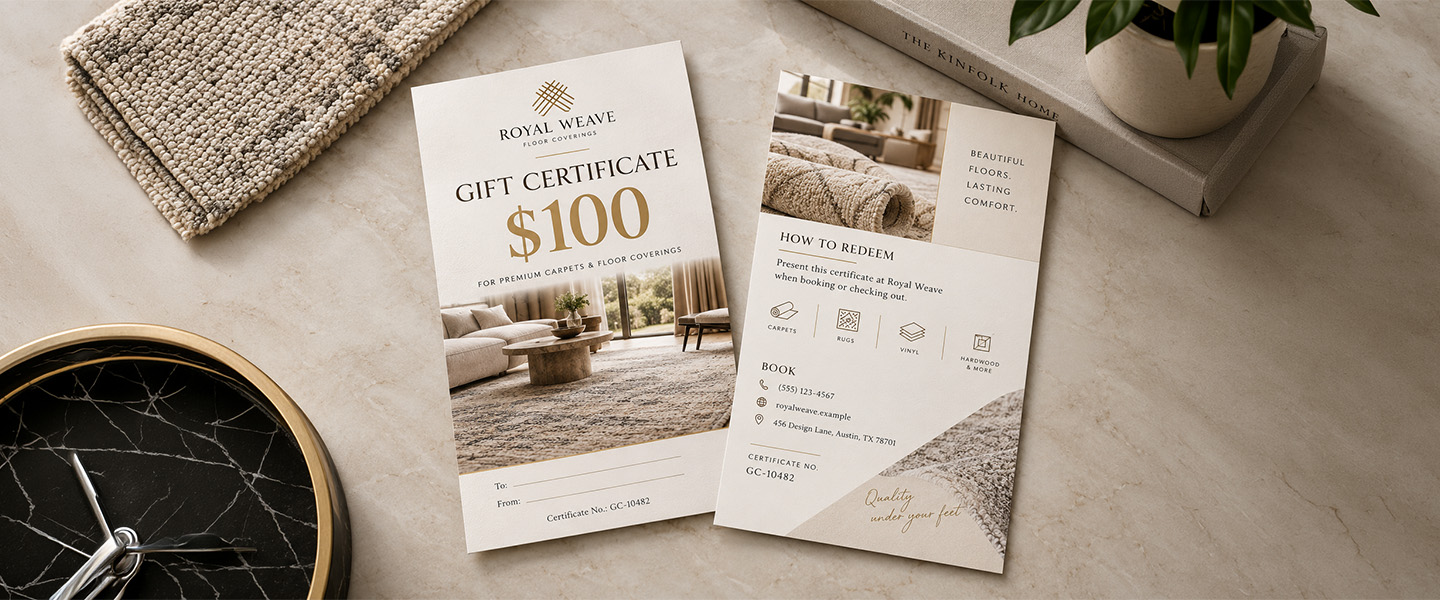
At this point, our blank certificate is starting to take shape.
A practical design might contain:
FRONT
YOUR LOGO
GIFT CERTIFICATE
$100
To: __________________
From: ________________
Certificate No.: GC-10482
BACK
HOW TO REDEEM
Present this certificate at Willow Spa when booking or checking out.
BOOK
willowspa.example
(555) 123-4567
CERTIFICATE NO.
GC-10482
TERMS
Applicable terms and conditions.
The exact information depends on your business, but the structure separates the experience into two sides:
Front = the gift
Back = how it works
That can keep the front attractive without sacrificing useful information.
Build the Visual Hierarchy Before You Decorate
Before choosing flowers, patterns, icons, gradients, or illustrations, decide what the reader should notice in order.
For example:
1. What is this?
GIFT CERTIFICATE
2. What did I receive?
$100
3. Where can I use it?
Willow Spa
4. Who is it for?
To: Maria
5. How do I use it?
Book at willowspa.example
6. Which certificate is this?
GC-10482
Once that hierarchy works, you can make it beautiful.
Starting with decoration and trying to squeeze the information in afterward usually makes the layout harder.
Make It Look Like Your Business
A gift certificate should feel like it came from your brand.
That doesn’t mean filling every empty area with your logo.
Use the same visual language customers already associate with you.
That could include:
- Brand colors
- Logo
- Typography
- Photography
- Illustration
- Patterns
- Graphic elements
- Tone of voice
Imagine three businesses.
A Luxury Spa
Soft typography.
Plenty of white space.
Subtle branding.
Minimal information on the front.
A Children’s Art Studio
Bright shapes.
Playful typography.
Energetic illustration.
A Fine-Dining Restaurant
Elegant typography.
Restaurant logo.
Simple color palette.
Minimal decorative elements.
All three are gift certificates.
They shouldn’t look the same.
The design should make sense for the experience someone is receiving.
Use Typography to Create the Mood—Not Confusion
Gift certificates are one place where decorative typography can work beautifully.
But use it selectively.
A script font might look lovely for:
A Gift for You
It may not be ideal for:
Certificate Number GC-10482
or a paragraph of redemption instructions.
Combine personality with readability.
You might use:
Decorative or expressive font: short headline
Primary brand font: business name and key information
Highly readable font: terms and redemption instructions
If you’re deciding between font styles, our serif vs. sans serif guide explains how typography choices can influence the look and readability of printed materials.
Leave Space for Anything Written by Hand
This sounds obvious until you try to write on the finished certificate.
If employees will manually add:
Amount
Recipient
Purchaser
Date
Certificate number
or a signature, design those areas for actual handwriting.
For example:
To: ___________________________________
is more practical than:
To: ______
Also think about the surface you’re printing on if handwriting is part of the process. Some finishes and coatings may be easier to write on than others.
Test the actual writing tool and finished material before placing a large order.
Should You Add a QR Code?
A QR code can be useful when it has a specific job.
For example:
SCAN TO BOOK
could direct someone to your appointment page.
SCAN TO SHOP
could lead to your online store.
SCAN FOR MENU
could open a restaurant menu.
SCAN FOR DETAILS
could lead to information about how the certificate can be used.
Don’t add a QR code simply because there’s an empty corner.
Ask:
What useful action becomes easier if someone scans this?
If the answer is unclear, you probably don’t need it.
If you do include one, print a physical test and scan it before approving the final design.
Could the Certificate Work Like a Postcard?
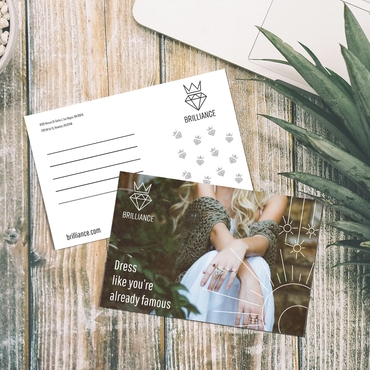
Depending on the format you’re creating, a postcard-style piece can give you enough space for a visually strong front and practical information on the reverse.
The front can focus on the gift:
DINNER IS ON US
$75 GIFT CERTIFICATE
The back can handle:
To / From
Certificate number
Redemption instructions
Contact information
Terms
That separation can make the design easier to understand.
Custom postcards are one print format you can consider when the dimensions and paper options suit your certificate design.
Before choosing a size, think about how customers will give the certificate.
Will it go inside:
A greeting card?
An envelope?
A small gift box?
A shopping bag?
A mailed package?
The physical context matters.
Or Use a Business-Card Format for Smaller Certificates
Some businesses may prefer a compact certificate or promotional voucher.
For example:
FREE COFFEE & PASTRY
or:
$20 TOWARD YOUR NEXT SERVICE
A business-card-sized print may work for smaller certificates, vouchers, or promotional offers where only a limited amount of information is needed.
But don’t force a complicated gift certificate onto a tiny format.
If you need several terms, personalization fields, instructions, and a QR code, give the design enough room.
Make the Gift Certificate Feel Like a Gift
The certificate may be operationally simple.
The presentation doesn’t have to feel transactional.
Imagine these two experiences.
Option A
The cashier hands the purchaser a loose certificate.
“Here you go.”
Option B
The certificate is placed inside a branded envelope or card.
The front says:
SOMETHING SPECIAL IS WAITING FOR YOU
Inside is the certificate.
Same monetary value.
Different experience.
If gift certificates are an important revenue stream for your business, presentation deserves attention.
You could pair the certificate with:
- Branded envelope
- Greeting card
- Sticker
- Sleeve
- Thank-you card
- Small gift box
- Tissue paper
- Product sample
You don’t need all of them.
One thoughtful presentation element can make the purchase feel more intentional.
For packaging orders, our guide to packaging insert ideas for small businesses also has ideas for adding small branded touches to the customer experience.
Don’t Forget the Person Buying It
Most gift certificate design focuses on the recipient.
But someone else may be making the purchase.
Make that process easy too.
Your team should know:
How do I sell one?
Where do I record it?
How do I assign the certificate number?
Can customers choose any amount?
How do I process payment?
Do I fill in the recipient’s name?
Do I package it?
What do I tell the purchaser about redemption?
If employees improvise the process every time, errors become more likely.
Create a simple internal workflow before promoting gift certificates heavily.
What About Gift Certificates Purchased Online?
If customers can buy a gift certificate online, decide whether they receive:
A digital certificate
A physical certificate
or
A choice between the two
For physical certificates, determine:
Who fills them out?
How quickly are they mailed?
Can they be sent directly to the recipient?
Can the purchaser include a personal message?
For digital certificates, determine:
How is the certificate delivered?
What identifies it?
How is it redeemed?
Can it be printed?
Your printed design should fit into the broader system rather than operating separately from it.
Design for the Moment of Redemption
Here’s a useful test.
Pretend you’re an employee who has never seen this certificate before.
A customer hands it to you.
Can you quickly identify:
The value?
The certificate number?
Any applicable terms?
How to verify it?
Whether there’s a remaining balance?
A design can be beautiful for the recipient and frustrating for the employee processing it.
Both experiences matter.
Keep operational information in a predictable place.
The back or lower portion of the certificate is often useful for these details.
Run a Fake Transaction Before Printing
This is one of the easiest ways to catch problems.
Print one sample at actual size.
Then pretend to buy it.
Fill in the fields.
Put it inside the intended envelope.
Give it to someone else.
Ask them:
What is this worth?
Where can you use it?
How would you redeem it?
Can you find the certificate number?
Then pretend they bring it back to your business.
Can an employee process it?
Can they verify the certificate?
Can they tell whether it has already been used?
If any part of that process is confusing, fix it before ordering the full batch.
Proof the Information, Not Just the Design
Before approving your gift certificate, check:
Business name
Logo
Value or offer
Website
Phone number
Address, if included
QR code
Redemption instructions
Certificate number format
Terms
Spelling
Then check the production side:
Final size
Bleed
Safe area
Image resolution
Color mode
Front/back orientation
Our guide to how to prepare files for printing covers the technical checks that help avoid surprises between the screen and the finished print.
A Gift Certificate Template You Can Build From
You don’t need to copy this wording exactly, but here’s a simple framework:
FRONT
[LOGO]
A GIFT FOR YOU
$100 GIFT CERTIFICATE
To: ______________________________
From: ____________________________
Message: _________________________
Certificate No. GC-00001
BACK
HOW TO USE YOUR GIFT
Present this certificate when purchasing eligible products or services at [Business Name].
Book / Shop:
[yourwebsite.com]
Questions?
[phone / email]
Certificate No.: GC-00001
Terms:
[Insert applicable terms and conditions.]
That’s enough structure to start designing without locking every business into the same layout.
The Best Gift Certificate Is Easy to Give and Easy to Use
A gift certificate has two personalities.
To the customer, it’s a gift.
It should feel attractive, thoughtful, and worth giving to someone.
To your business, it’s a transaction that eventually needs to be verified and redeemed correctly.
Strong design connects those two needs.
Make the value obvious.
Make the brand recognizable.
Give the certificate a clear identity.
Explain redemption simply.
Leave room for personalization when appropriate.
And don’t let decoration make the important information harder to find.
The result should make sense at three moments:
When someone buys it.
When someone receives it.
When someone redeems it.
If all three are easy, the design is doing its job.
Gift Certificate FAQs
What should be included on a gift certificate?
A gift certificate should clearly identify the business, value or included service, redemption information, and any necessary terms. Depending on your process, it can also include recipient and purchaser names, a personal message, certificate number, website, phone number, and QR code.
How do you make a gift certificate look professional?
Use a clear hierarchy, consistent branding, readable typography, adequate white space, and a limited number of visual elements. The value or offer should be easy to find, while instructions and terms should remain readable without overwhelming the design.
Should a gift certificate have a unique number?
A unique certificate number or code can help a business identify and track certificates. It should connect to whatever internal system the business uses to verify purchases, redemptions, and remaining value.
Can a gift certificate have an expiration date?
Expiration and fee rules can depend on the type of certificate and applicable laws. Businesses should check the requirements that apply to them before adding an expiration date or related restriction to a printed certificate.
Should I put terms and conditions on a gift certificate?
Include terms that customers need in order to understand how the certificate can be used, but make sure those terms accurately reflect your policies and applicable requirements. More extensive terms may also be provided through another appropriate channel.
What size should a gift certificate be?
There is no single required size. Choose a format based on the amount of information, presentation, and how the certificate will be delivered. A compact format may work for simple offers, while larger formats provide more room for personalization, instructions, and branding.
Can I put a QR code on a gift certificate?
Yes. A QR code can direct recipients to a booking page, online store, menu, redemption information, or another useful destination. Make sure the QR code has a clear purpose and test it from a printed proof before production.
What should go on the back of a gift certificate?
The back can hold redemption instructions, terms, contact information, website, QR code, certificate number, or other supporting information. This keeps the front focused on the value and gift experience.
Can I create gift certificates for services instead of dollar amounts?
Yes. A certificate can represent a specific product, service, package, or experience instead of a monetary amount. Clearly describe what the recipient is entitled to receive and include any necessary redemption information.
How do I prevent gift certificate confusion at redemption?
Use a consistent certificate number or tracking method, maintain an internal record of issued certificates, train employees on the redemption process, and clearly display the information employees need to verify the certificate.